•



Did you know that you can look at an area on the map you’re interested in buying a property, and automatically see which ones are vacant, behind on taxes, and more!?
If not, that’s okay.
That’s why we’re showing you now… because sometimes cool, helpful features like this slip through the cracks.
But we don’t want it to, because this feature will help you find properties and deals faster.
Here's what to do if you’d like to see a bunch of properties that meet your criteria all at once.
First, go into your maps setting and then to filters.
When setting up your highlights, think about the type of properties you want (for flips / buy-and-hold) or that your buyers want if you are wholesaling.
Does that area lend itself to bigger families who need 4+ bedrooms, and like extra square footage? Or is this area geared towards empty nesters, starter homes, young professionals, etc.?
Create a preset around each "target" with clear titles describing which filters have been used on that highlight.
You can choose what types of properties you want to see:
- Absentee Owner
- Owner Occupied
- Corporate Owned
You can also filter by equity percentage:
- Over 10%
- Over 20%
- Over 50%
And when it was last sold:
- Sold over 2 years ago
- Sold over 5 years ago
- Sold over 10 years ago
Property Value:
- 0-49k
- 50-199k
- 200-499k
- 500k+
You can use just one, or combine them to be more specific.
You'll see all of the properties that meet your criteria highlighted in green:
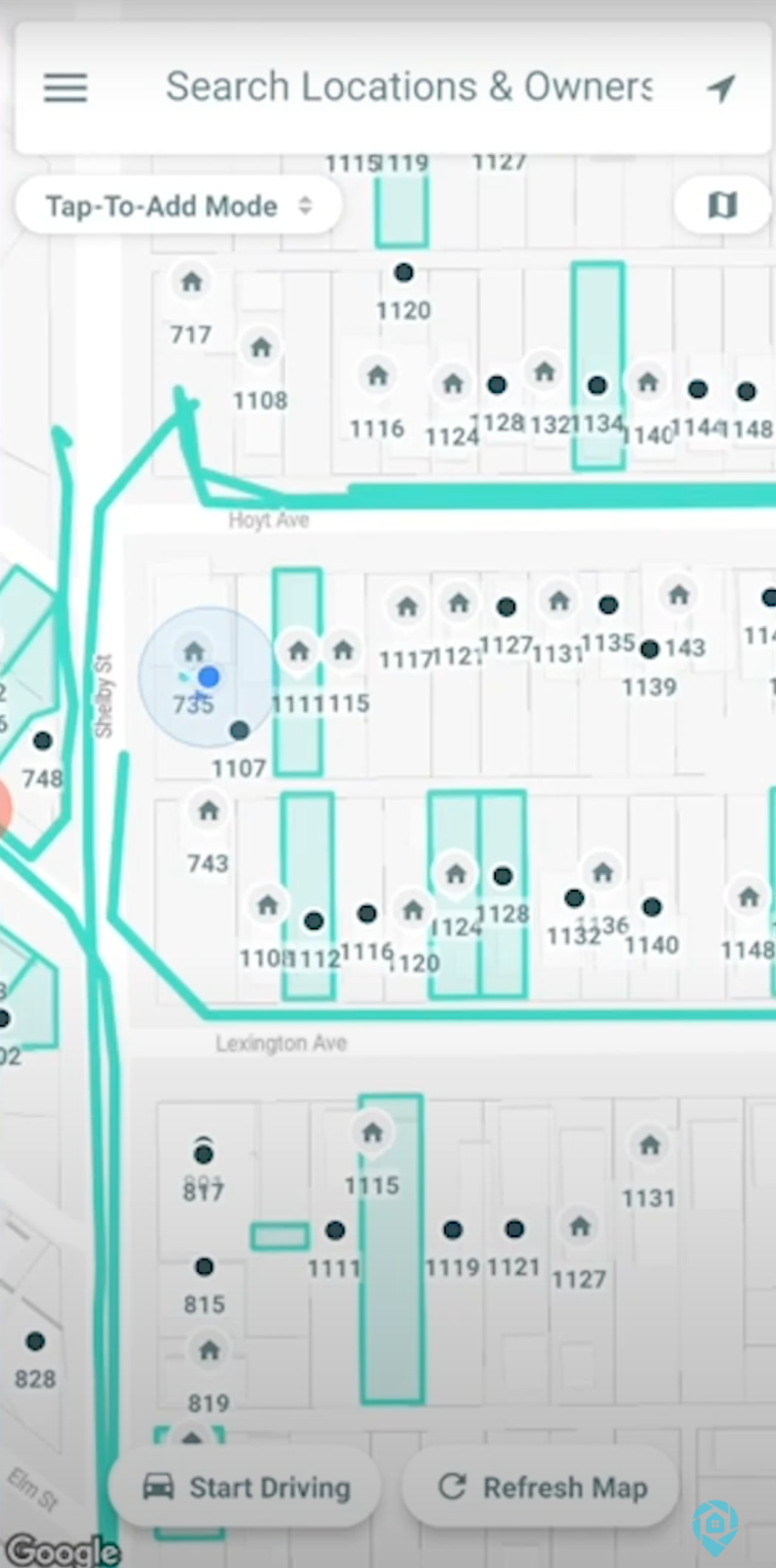
This is a great way to look for places for your drivers to drive.
You can say, for example, “Hey, there are a lot of properties over on Lexington Ave, go drive there and check it out.”
You can even set your filters as a DealFinder preset, so that your drivers can easily know with just a glance which properties are most in line with your needs.
If you’d rather just see a video of how this works, here’s a quick one under 2 minutes that shows you how:
Get the DealMachine App
Once you identify distressed properties that are ripe for deals, use the DealMachine real estate management software to stay organized, follow up, and send mailers. For your best chances of success right off the bat, follow our “Distressed Formula” by finding 300 properties and sending three postcards apiece. Try it out with a free 7-day trial of DealMachine.